
Losing a domain can damage any business, but simple preventive steps can protect you from costly mistakes and domain theft. This article outlines ten essential rules to keep your domain secure and always in your control.
Key Takeaways
- Choose Wisely – Always register your domain with an ICANN-accredited registrar to ensure authenticity and protection.
- Proper Ownership – Use your own name and email as the registrant and admin to maintain complete control.
- Stay Active – Renew early or enable auto-renewal to prevent accidental expiration.
- Boost Security – Enable Whois Privacy, DNSSEC, and domain locks to shield against hackers.
- Think Ahead – Register lookalike domains and use 2FA and strong passwords to strengthen defense against phishing or typosquatting attacks.
TABLE OF CONTENTS
- Key Takeaways
- Rule 1: Register Your Domain With An ICANN-Accredited Registrar
- Rule 2: Always Register Your Domain In Your Name
- Rule 3: Use Your Email Address For Your Registrant Contact Details
- Rule 4: Never Let Your Domain Name Expire Before Renewing It
- Rule 5: Use Whois Privacy Protection To Safeguard Your Domain
- Rule 6: Enable DNSSEC On Your Domain
- Rule 7: Always Lock Your Domains
- Rule 8: Be Vigilant. Keep An Eye On Phishing Attacks
- Rule 9: Implement 'Extra' Security Measures To Keep Your Domain Safe
- Rule 10: Register Lookalike Domains
In 2015, Google forgot to renew its domain name, Google.com, and it was listed on the marketplace for a few hours. Sanmay Ved, a former Google employee, was surfing the internet and came across the domain listed for sale.
He purchased the domain immediately for $12, even though his ownership was short-lived only for a minute Google paid $12,000 to get it back.
Losing your domain name as a business owner is one of the most terrible things you can face. Even if you're lucky enough not to lose it to the bad guys, you might not have the thousands or millions of dollars that Google has to get it back.
So, instead of 'hoping' it doesn't happen to you, we've compiled nine (9) preventive measures to help you never lose your domain again – even without notice. You'll also learn how Trustname helps to secure your domain against theft, hijacking, and unauthorized transfers.
Rule 1: Register Your Domain With An ICANN-Accredited Registrar
The first and most crucial step to securing your domain is to choose an ICANN-accredited registrar with a verifiable track record. Currently, thousands of websites sell domain names. But a good number of them are in business just for your money.
What to do – While it's easier to go for famous names in the industry, do your due diligence by checking out real-life customer reviews, pricing, and customer support.
Some go the extra mile to pay off reviewers to earn a five-star review, so a good way is to ask for recommendations on domain communities like NamePros, subreddit channels, or Facebook groups.
Don't invest your money in a domain registrar until you've answered the following questions :
ICANN (International Corporation for Assigned Names and Numbers) is the official organization responsible for managing the Internet, including domains.
If they're just starting or have been in business for less than 5—10 years.
By default, a credible domain registrar should have a robust security system that protects its user's domains. This includes domain lock, Whois Privacy Protection, and two-factor authentication. If the registrar doesn't have any of these, it's a red flag.
A domain reseller buys a domain and resells it to make a profit. ICANN doesn't accredit this person and is not affiliated with any domain registry. As a result, partnering with resellers provides no security for your domain, and you're at risk of purchasing a stolen domain.
Njalla Is Not a Trusted Registrar
Njalla is not an ICANN-accredited registrar. They are a Tucows reseller, meaning your domain is registered under
Tucows, not directly under your name. For proper security and privacy, always go with an ICANN-accredited
Registrar like Trustname.
Some registrars make it difficult to discontinue their services. They impose hidden fees or make transfers difficult so that you won't transfer your domain from their platform. Always check the registrar's transfer policy before making any commitments.
You don't want to partner with a registrar who has poor customer support. They'll likely be unavailable to troubleshoot whenever you encounter issues that can affect your business.
Rule 2: Always Register Your Domain In Your Name
When registering your domain for the first time, you'll be required to provide contact details for :
- The registrant – The owner of the domain name.
- The admin – The person in charge of managing the domain.
- Billing – The person overseeing payments.
- Technical – The person fixing all technical issues.
Legally, whoever is listed as the registrant of the domain, for all intents and purposes, owns the domain. It doesn't matter whether you hired a web developer to register a domain and build a website for you or assigned your 'trusted' employee to manage the domain.
And whoever is listed as an 'Admin' can change or transfer the domain on your behalf.
What to do – Use your details (or your business's) as the registrant and admin to prevent any hiccups in the future. Also, cross-check your current domains to see whose details are listed there and ensure they're listed under your name or brand.
Rule 3: Use Your Email Address For Your Registrant Contact Details
Another thing you need to consider is the email address used for your registrant or admin details. This email will be used to communicate vital information about your domain, including transfer requests, authentication codes, renewal dates, etc. So, you must use an email that's yours, accurate, and easily accessible.
What to do – While you may be tempted to use a random email address from your internet service provider or third-party providers like Yahoo or Gmail, a better option is to register a separate email address as the official email for all your domain names.
This way, you can retain control over your domain notifications and consolidate all vital information from your domain registrars in one place.
Rule 4: Never Let Your Domain Name Expire Before Renewing It
After analyzing one million top-level domains, Techround discovered that only 30% renew their domains after they expire. This leaves a whopping 70% of unrenewed domains!
Once your domain expires, it takes 30-70 days before it's released to the marketplace for re-registration. And the moment this happens, you may never get it back. And even if the new owner is willing to resell, you may need to pay hundreds or thousands of dollars to get it back.
This is why we advise our users not to allow their domain(s) to expire before renewing them.
What to do:
- According to ICANN's policy, all ICANN-accredited registrars must send you two reminders before your domain expires. This is why you should only register your domains with ICANN-certified registrars like Trustname! If you already have, keep an eye out for these emails in your inbox and take action immediately after you get them.
- Ensure the email address you use to register your domain is accurate and belongs to you. Many business owners make the mistake of registering their domains through their web developer's or designer's contacts.
Once these guys disappear, you may not be able to regain access to your domain or receive important information, such as renewal dates, from your registrar. Remember rule #3.
- Enable auto-renewal on your account to prevent your domain name from expiring. This ensures your business continues to operate and that expired domains do not cause outages. Also, ensure your credit card information is up-to-date so the auto-renewal process proceeds seamlessly.
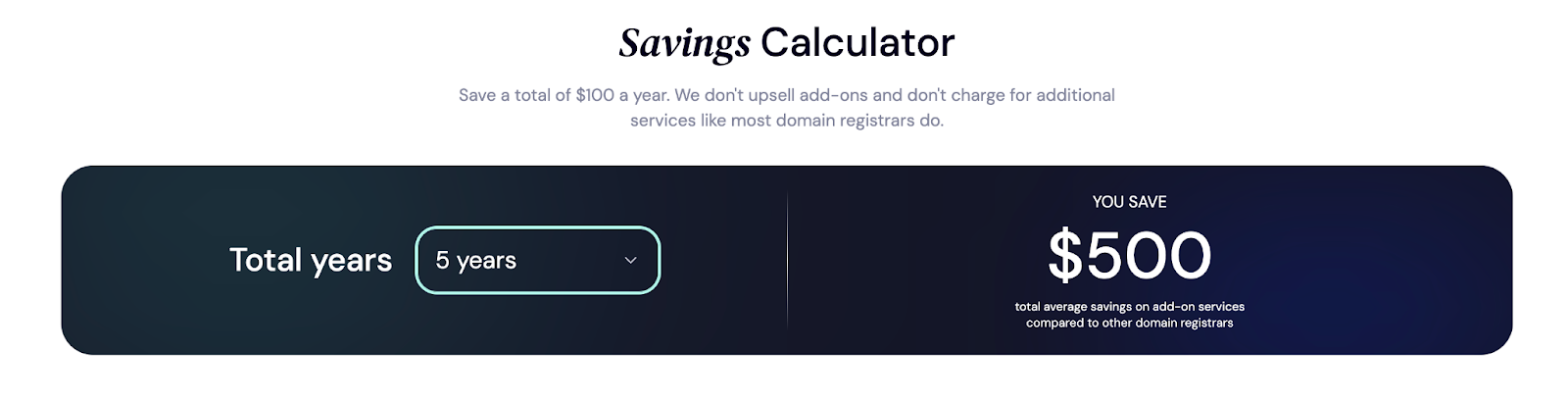
- Register your domain for a longer term (up to 10 years) so you don't have to worry about tracking your renewal dates. Registrars like Trustname give you a discount on the total payment when you register for a longer duration:
Rule 5: Use Whois Privacy Protection To Safeguard Your Domain
According to ICANN's policy, all domain owners are required to provide their registrant information to the public. This data is publicly displayed in the Whois database and can be retrieved by anyone, including hackers and cybersquatters.
This is why you need Whois Privacy Protection to safeguard your domain(s).
What to do – Most A-list registrars offer Whois Privacy Protection services to conceal your domain details from the public.
At Trustname, for instance, we go the extra mile to provide all our users with a two-tier domain privacy protection. In the first layer, you can register your domain through our proxy partner, Perfect Privacy LLC.
So, whenever a user (or someone with malicious intent) searches for your domain on the Whois database, PP LLC will be the first point of contact, not you.
Trustname ensures you retain complete control of your domain, and you can always revert to using your own details in one click.
The second layer is the regular Whois Privacy Protection service, which masks your domain from the public. You can use this to conceal your personal details (or PP LLC if you choose that option). Both options comply with ICANN's policy and are a great way to protect your domain from public exposure.
And the best part? Our two-tier privacy is entirely free!
The two-tier protection is optional, and you can easily turn off our two-tier privacy on your account if you don't want any privacy for your domain. Read more about our two-tier privacy protection here.
Rule 6: Enable DNSSEC On Your Domain
You're probably wondering what DNSSEC is and how it helps secure your domain. Well, this is it in a sentence. DNSSEC (Domain Name System Security Extension) is a security protocol that adds an extra layer of security to your DNS nameservers.
For content, your DNS acts like a phonebook; it translates domain names (like example.com) to IP addresses (like 192.168.123.132), and this information is saved in a database called 'nameservers'.
So, whenever a user types your domain name in their browser, the DNS retrieves the corresponding IP address from the nameservers and directs them to the correct address.
However, this system has many vulnerabilities, making it easy for hackers to manipulate IP addresses and redirect users to a malicious website.
Now, back to DNSSEC.
DNSSEC uses a cryptographic public-key signature that DNS resolvers must verify before converting domain names to IP addresses and users. This prevents hackers or spammers from manipulating DNS name servers or carrying out other DNS attacks, such as spoofing and cache poisoning.
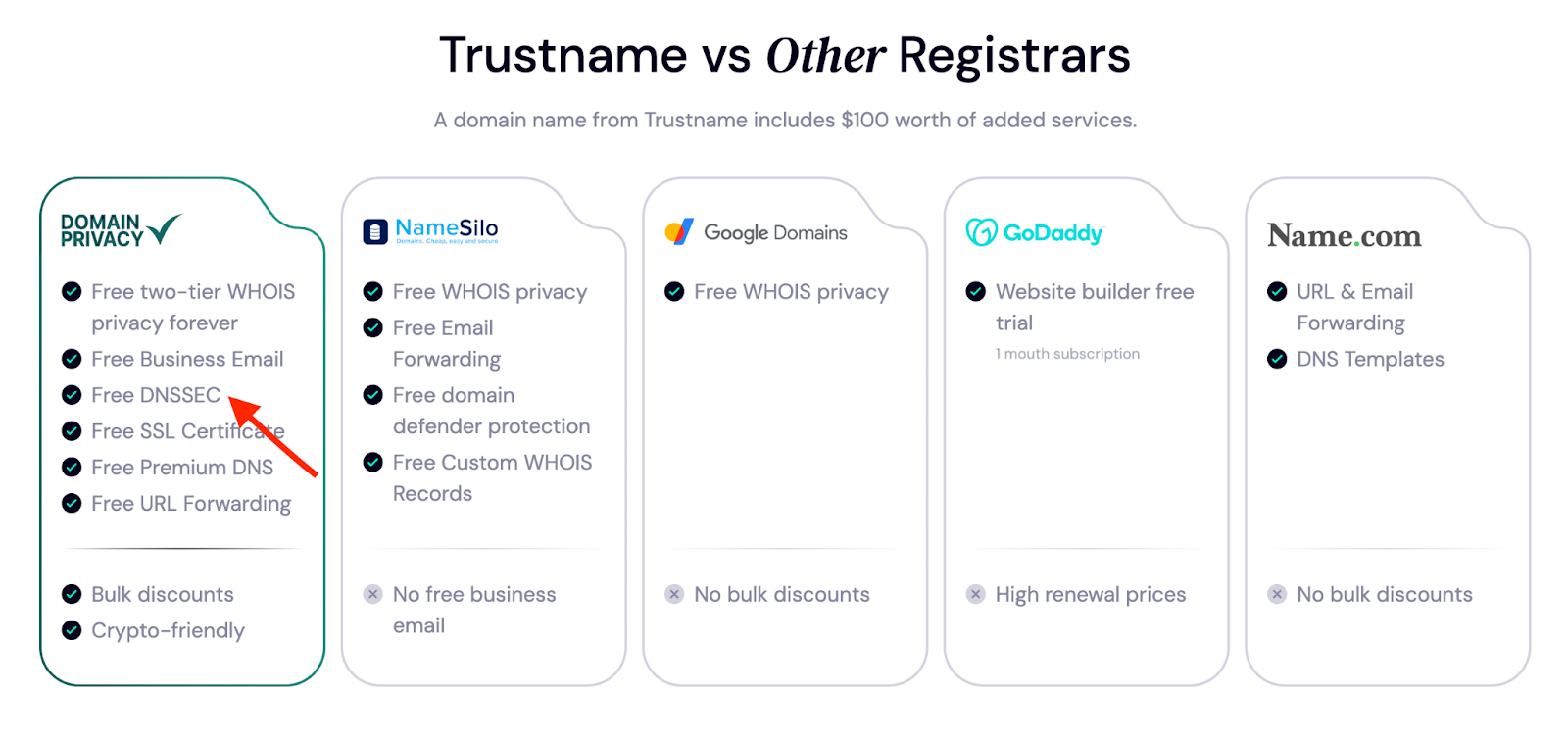
What to do – Usually, most registrars offer DNSSEC for a small fee, but it's free for all Trustname users.
Rule 7: Always Lock Your Domains
Domain lock is a temporary lock placed on your account to prevent unauthorized changes or transfers. Most registrars place this lock on your domain by default, and you can turn it off whenever you have any changes to make to your account.
For instance, at Trustname, we have two types of locks in this category :
- TransferProhibited – This prevents your domain name from being transferred from your account without your consent.
- TeleteProhibited – This prevents your domain name from getting deleted from your account without your permission.
We also send email notifications to alert you of any changes made to your account. This way, you can track what happens with your domain and quickly address any unauthorized actions.
What to do – Opt for registrars with domain lock options and ensure they're always locked except when you need to make changes or transfer your account.
Rule 8: Be Vigilant. Keep An Eye On Phishing Attacks
Domain phishing (or spoofing) is another way hackers gain access to your domain name. In this case, they send an email mimicking your domain registrar and trick you into logging into your domain account using a fake website that looks like the actual one.
Once this happens, the hacker gains access to your account and may :
- Transfer your domain.
- Change the registrant details.
- Reroute your DNS nameservers to the IP address of a malicious site.
What to do – If you have another person or team managing payments for your account, educate them on phishing attacks and recognizing legitimate emails from your registrar.
A better option is to bookmark your registrar's website on your browser. So, instead of clicking on links from your emails, you can access your domain account by following the link bookmarked on your browser.
Lastly, always look for the 'padlock' sign on your browser when logging into your domain account. This way, you'll verify that the site is secure. But this isn't foolproof, as anyone can get a DV SSL certificate.
Rule 9: Implement 'Extra' Security Measures To Keep Your Domain Safe
We've mentioned the importance of choosing registrars with robust security systems. Some of these features, such as domain locks, are enabled on your account by default.
However, you have a role to play as well. For example, some registrars allow you to limit your account logins to a specific IP address or country. So, even if your domain gets compromised, the hackers won't be able to access it outside the limitations you've set.
What to do – Some additional measures you can implement are –
- Use strong password combinations. Your password should differ from your domain name and include a mix of letters, numbers, and special characters. If you have multiple domains, use different password combinations for each.
Or, better yet, use a password manager like 1Password or LastPass to generate unique passwords for your domains and store them securely.
- Enable two-factor authentication (2FA) on your domain account. With 2FA, whenever you log in to your account, you must verify your identity by receiving an authentication code via the associated email address or a third-party app like Google Authenticator.
Most registrars, like Trustname, have this option to prevent a third party from accessing your account even when your password has been compromised.
- Implement an SSL certificate on your site. This tells your users that your website is secure and their information is safe from the wrong hands. It's also their way of verifying if they're on the right site.
- Use DMARC (Domain-based Message Authentication, Reporting, and Conformance) to validate the authenticity of the emails you receive from your registrar. Let's break that into digestible bits.
- DMARC acts as a security officer by checking the domain associated with your domain (the address after the '@') to ensure it comes from who it claims to be. If DMARC notices any discrepancies, it sends the email to the spam folder or refuses to deliver it. This helps prevent phishing or spoofing scams.
Rule 10: Register Lookalike Domains
Sometimes, cybersquatters or hackers purchase and register lookalike domains for your primary domain name to exploit users who mistype it in their browser, redirecting them to a malicious site. This is called typosquatting.
Once this happens, they either :
- Mimic your domain to collect your customer's personal information or
- Advertise explicit content or,
- Install malware to infect their devices.
For example, instead of buying yourdomain.com, they may register yourdomain.com or yourdomain.net. These domain names may contain extra letters (like yourdoomain.com) or another domain extension (e.g., yourdomain.net).
What to do – Register lookalike variations of your domains to consolidate your brand presence. You can also consider acquiring other TLDs, such as .net or .org.
For example, Google acquired domains in different TLDs, such as .net and .org, and in ccTLDs, such as .ca, .us, and .uk. So, whenever you type this domain name in your browser, you get redirected to the .com domain.
How Trustname helps to safeguard your domain
Trustname isn't your regular domain registrar—we prioritize the security of our user's domain names.
For us, your business security comes first. We have built a sturdy, elaborate security system to protect our user's domain names even when asleep.
Instead of charging extra fees for premium security features like DNSSEC, SSL certificates, Whois Privacy Protection, branded email, and DDoS protection, all Trustname users enjoy these for free — forever!
To top it all off, our proprietary two-tier Whois Privacy Protection creates a legal shield to protect you from anyone trying to retrieve your domain name details (even legally).
We partnered with proxy companies across different regions—the United States, St. Kitts & Nevis—and will disclose your domain details only when we receive court orders simultaneously from these regions and from Estonia (where Trustname is headquartered).