
This article explains how to transfer your domain from Epik to Trustname, highlighting common issues with Epik and the benefits of moving to a more reliable registrar. It also provides a clear, step-by-step overview to help ensure a smooth and secure transfer process.
Key Takeaways
- Reliability – Trustname focuses on preventing accidental domain loss with clear renewal policies and grace periods.
- Speed – Domains are registered instantly, with no delays after payment.
- Payments – Trustname offers smooth payments, multiple payment options, and transparent refunds.
- Support – Customers receive real-time help from knowledgeable human support agents.
- Privacy – Two-tier privacy simplifies verification while maintaining strong Whois protection.
TABLE OF CONTENTS
- Key Takeaways
- What Perks Should You Expect From Trustname?
- To-Knows Before Initiating Your Transfer
- To-Dos (Epik Side) Before Initiating The Transfer
- Transferring Your Domain From Epik To Trustname
- Safeguarding Your Domain at Trustname
- Troubleshooting Failed Domain Transfers
- Rounding Up
Are you a current Epik customer looking to transfer your domains to Trustname? Chances are, you're done with their poor support, glitchy payments, slow registrations, and the constant worry of losing your domains at any time.
Many of our current customers, who were formerly at Epik, praise us for how seamless the domain registration process is on our platform, how far we go to ensure they never lose their domains, and how we provide them with all the help they need, on demand. And we can't wait to have you too!
To ensure your domain is transferred smoothly, you'd need to confirm your domain's eligibility, disable the domain lock, generate the Auth code, and then initiate the transfer at Trustname.
Ready to move to Trustname? Let's guide you through the process. But first…
What Perks Should You Expect From Trustname?
Wondering what you should you expect to enjoy if you move your domain to Trustname? Let's show you!
- Renewal policies that ensure you keep your domain
Several of Epik's customers complain of the broken renewal process on Epik. From renewals not being processed despite being paid for to placing expired domains on auction even while they are still in the Grace Period.
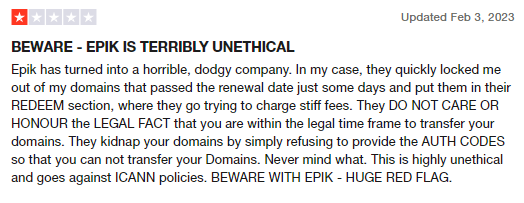
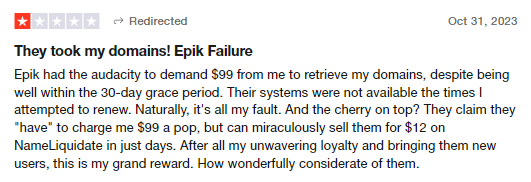
Many domain owners also complain about finding their domain names deleted from their accounts due to expiry but never received any renewal notifications, or only received one.
At Trustname, we understand how valuable your domain name is and have set up several measures to ensure you never lose your domains due to accidental expirations. First, we encourage you to enable auto-renewal so that we renew your domain way before it expires.
[+] [Callout] Default Insert title here [+] [Callout] Title/Title with Icon -> If your payment method fails, we will send several emails to give you a heads up. And should your domain expire, we give you a 30 days Grace period, during which we reserve it for you at the standard price.
It's only after the Grace Period expires that your domain may be auctionable. In the Redemption Period, you can still renew it quickly, but you will need to contact us.
- Instant registrations
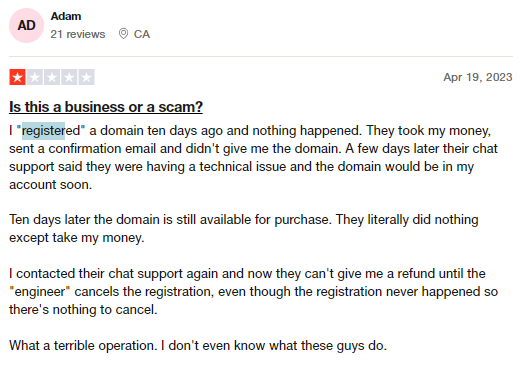
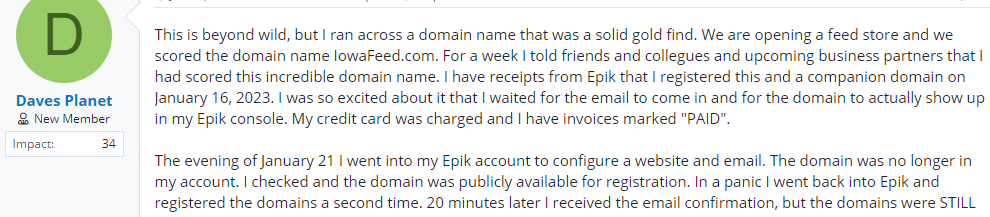
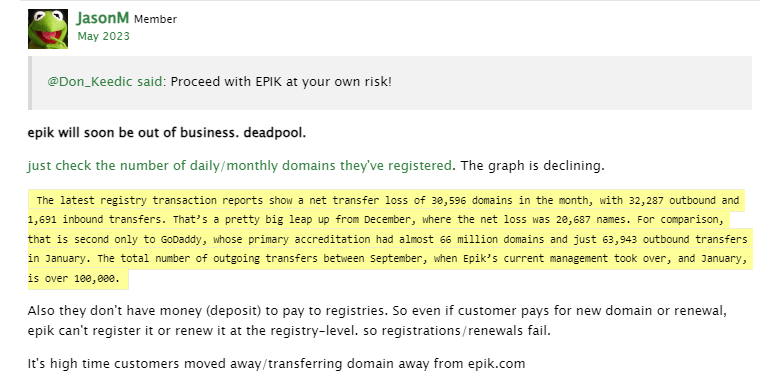
Another big flaw with Epik? They don't register domain names immediately. High-value domains are snatched up quickly, and you shouldn't have to wait for 5 days after paying before your domain becomes yours.
[+] [Callout] Info Insert title here [+] [Callout] Title/Title with Icon ->
Customers also complain of an incredibly glitchy payment system, the brand deducting payments for registrations and renewals but not actually affects them on the registry level. - Smooth payment
As an extension of the above point, Epik has also been known for its ultra glitchy payment system. Customers complain about getting charged without having their domains added to their accounts and for failed transactions, Epik refuses to refund the money but forces to accept in store credits.
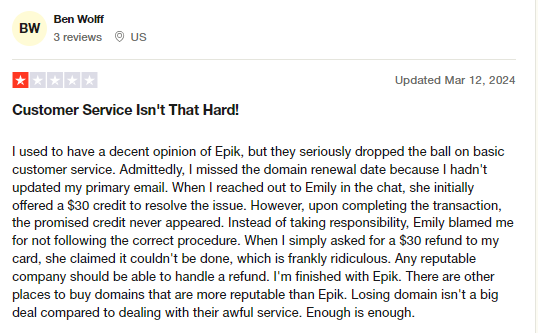
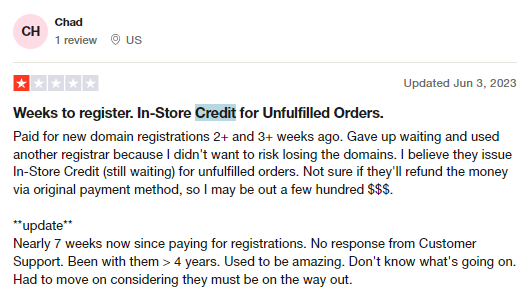
No one likes to be held ransom, especially when you didn't get the services you paid for. There's also no concrete way to tell if the in store credits are actually equal in value to the payments made.
Trustname makes paying for your essential services a breeze. We accept payments via credit/debit card, other popular payment solutions, and also cryptocurrencies. And our refund policy? We process refunds to your Trustname wallet or your payment method if supported.
You'll never need to request a refund for getting charged and never having your domain(s) added to your account.
Want to save yourself the headache? Come over to Trustname! Here, your domain is in your account immediately after you make a payment. And for renewals, with auto-renewal enabled, you'll never need to manually monitor your domains and can have your assets going without any downtime.
- Superior support
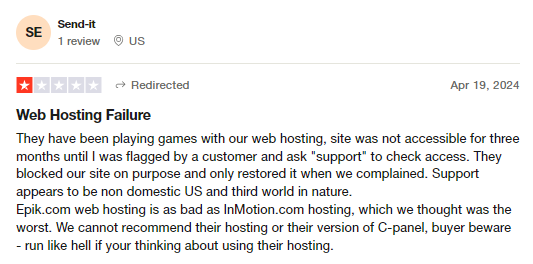
Customers also complain of Epik's support coming short. From agents who have limited knowledge about domain management to days between responses for basic inquiries, when you need on demand support, Epik may disappoint.


Trustname boasts of a support team comprised of human agents (not chatbots), many of whom are webmasters themselves, to help you troubleshoot any domain and hosting-related issues.
And the best part? We actually encourage our customers to contact us via live chat, so you can get all the help you need in real time. We also offer support tickets and a vast knowledge base for the DIYers among us!
Easy Verifications Our Two-Tier Privacy
When registering a new domain name, verifying your domain contact details should be as simple as clicking an email link or submitting a code sent via email.
Epik makes verifying domain contact information complicated and overreaches by trying to verify the physical address you specify among other credentials. This is after making payment by the way.
You may suddenly find your domain removed from your account and your management settings temporarily disabled until you 'verify' your contact information, even after carrying out the popular email verification.
Sounds like the perfect excuse to take your money and not give you the product (domain name) you paid for no?
Trustname's Two-Tier privacy
At Trustname, registering your domain and verifying your domain information is as easy as it gets.
- When registering a domain, you can decide to use your own details for your contact information, or you can use our pre-defined contact, where our security partner, Perfect Privacy LLC, is listed as the registrant you still retain full control of your domain and can change the domain contacts to yours at any time.
This is the first layer or first tier of our Two-Tier privacy.
- On the second tier, we mask your domain’s contact information from the Whois database (your own details or PP LLCs if you chose this option) with proxy details from another of our partner companies. This is the generic Whois privacy provided by most registrars, including Epik.
Why should you subscribe to your Two-Tier privacy? You will never have to verify your contact details since these details are trusted and verified already, ensuring a smooth registration process!
To Knows Before Initiating Your Transfer
There are some important points you should know while transferring your domain from Epik to Trustname.
Let's see them:
Review Your Domain Nameservers
In your Epik dashboard, you can configure your domain nameservers (and if you don't, they are assigned automatically to Epik's).
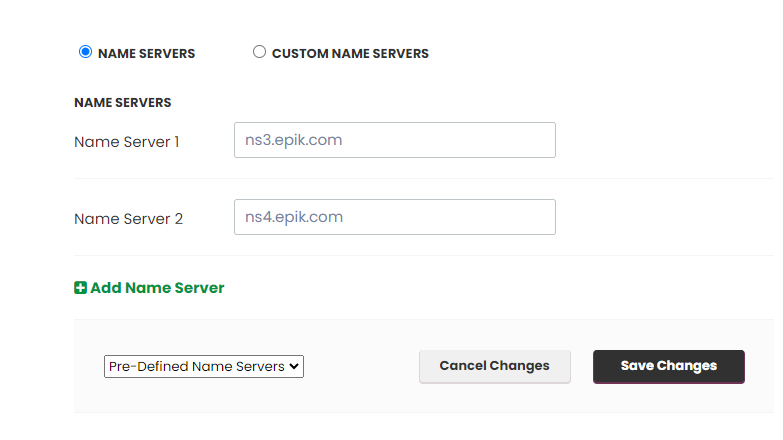
If you were using a different web host from Epik, you'd have had to update your nameservers. Your domain nameservers are responsible for directing web browsers to the IP address of the web servers where your website is hosted.
While your domain transfer is still ongoing, you won't be able to edit your domain nameservers or any other DNS settings. If your domain is linked to a website hosted by Epik, it's a good idea to point your nameservers to your new web host (Trustname or any other host you're using) before you initiate the transfer.
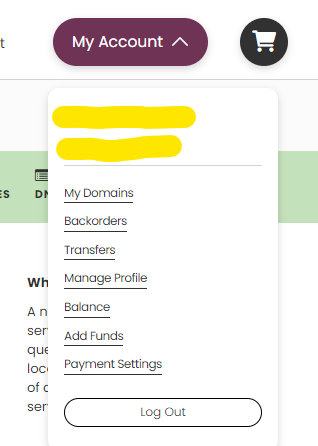
To review your nameservers, log in to your Epik account. Under the 'My Account' dropdown, click on 'My Domains'.
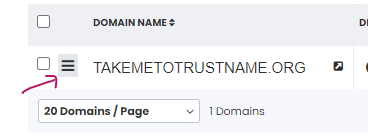
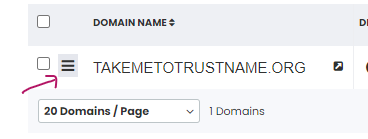
Click on the three-dot bar beside your domain in the list.
And under 'DNS & Whois' click on 'SET NAME SERVERS'.
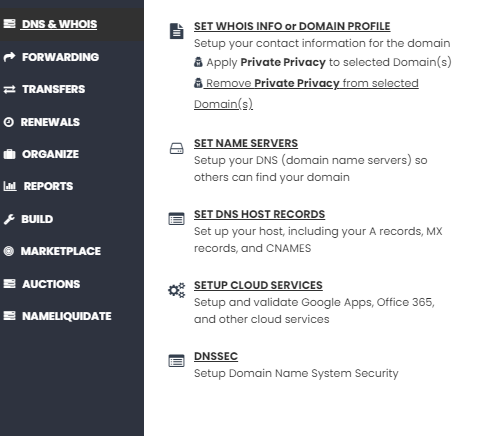
Review your nameservers here.
- Transferring Your Domain Doesn't Take Your Website Along
Moving your domain name to Trustname won't automatically carry your website along. If you want to also move your website to Trustname or another web hosting provider, you would need to purchase a web hosting plan from the new host and contact us, and we'll help you migrate your website conveniently.
We will guide you through creating backups of your website and exporting them, downloading database files, and moving them.
- Transfer Pricing And Policy
Trustname charges a base fee of $7.77 (with our promo code) to transfer your domain name to us but this adds an extra year to your domain name's current expiration date.
Given that our regular 1 year registrations cost $14.99 and our renewals, $12.99 per year, our transfer fee is actually a front to giving you an extremely affordable domain subscription!
- Transferring Expired Domains
On most registrars including Epik, you can only transfer a domain while it is active or during the grace period after it expires.
If you didn't renew your domain during the Grace Period and it's now in the Redemption Period, you are going to have to renew it first for an extra fee and wait for ICANN's 60 days lock to elapse.
We recommend initiating your transfer before it expires or at least two weeks before the end of the Grace Period. Transferring it to Trustname automatically adds a 1 year minimum subscription to it.
To Dos (Epik Side) Before Initiating The Transfer
To ensure your transfer goes through to Trustname smoothly, these are the steps you'll need to take to prepare your domain at your current registrar (Epik):
Confirm The Domain's Transfer Eligibility
To comply with the Internet Corporation for Assigned Names and Numbers (ICANN) regulations, registrars enforce a 60 days registrar or transfer lock on domains that were recently transferred or modified.
You won't be able to transfer your domain name until 60 days have passed since the last registrar transfer, registrant change, or change to the domain's contact details.
Confirm that your domain is eligible and out of the 60 days lock before proceeding with the transfer.
To confirm your domain's transfer validity, log in to your Epik account with your username and password, and under the 'My Account' dropdown click on 'My Domains' to see your list of domains:
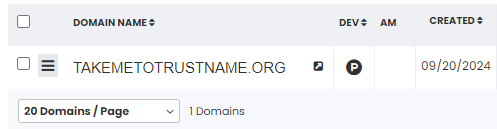
Click on the three dot bar beside your domain in the list…
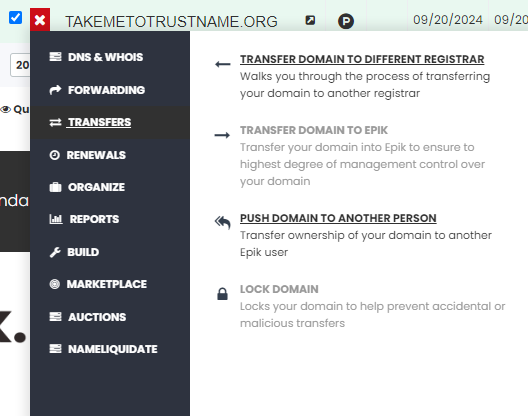
Under the 'TRANSFERS' tab, click on 'TRANSFER DOMAIN TO DIFFERENT REGISTRAR'.
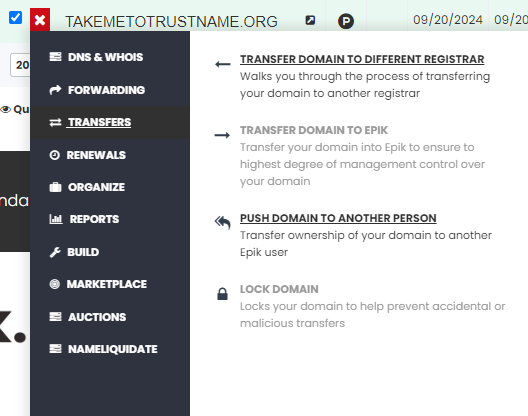
If your domain is not yet eligible for transfer, you'll get the status code specifying when it will be.
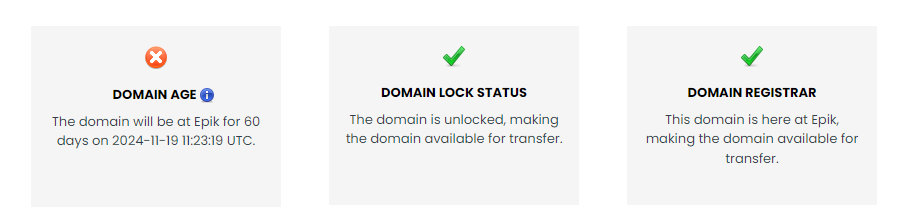
If it is eligible, all three transfer prep settings will check green.
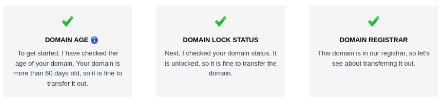
Disable the domain lock
After confirming that your are eligible for transfer and it's been at least 60 days since the last change, the next step is to disable the domain lock.
The Domain Lock is a basic feature offered by most registrars that prevents unauthorised transfers of domain names.
To disable the domain lock on your Epik domain, head to your domain list by clicking on 'My Domains' under the 'My Account' dropdown at the top right.
Click on the three-bar menu and under 'TRANSFERS' click on the 'TRANSFER TO A DIFFERENT REGISTRAR' button.
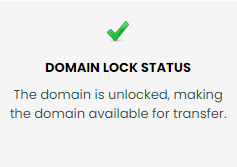
Under the 'DOMAIN LOCK STATUS' field, look for the 'Would you like to unlock the domain now' and click 'Yes'.
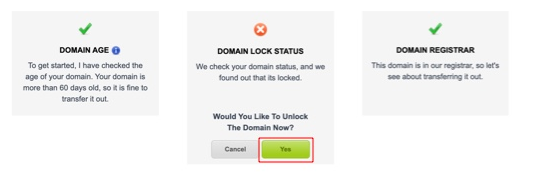
On clicking, the 'DOMAIN LOCK STATUS' should show that it is unlocked.
Obtain the Auth (EPP) Code
Getting the Auth Code on Epik is easy. Once you unlock your domain in the previous step, Epik will send the Auth Code automatically to your email.
However, you can also copy the Auth Code directly in the domain transfer status page. You will need to submit the Auth code to Trustname and we will use it to prove to Epik that you initiated the transfer.
To view your Auth code for your Epik domain, click on 'My Domains' under the 'My Account' dropdown. Click on the three bar menu next to the domain, and under 'TRANSFERS' click on 'TRANSFER DOMAIN TO A DIFFERENT REGISTRAR'.
On this page, once you unlock your domain, you'll see the Auth Code listed here.
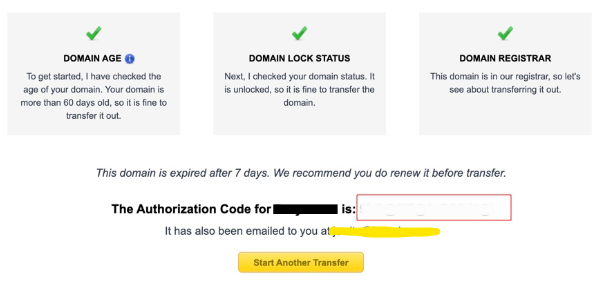

Copy the generated Auth Code and paste it somewhere safe for when you'll need it at Trustname.
Disable Whois Privacy
If you purchased Whois privacy from Epik (likely, this was added automatically to your cart), you may need to disable it for your domain to be transferred to Trustname smoothly.
To turn off your Whois Privacy on Epik, login to your Epik account and head to your domain list. Now, click on the 'Anonymous' icon next to your domain.
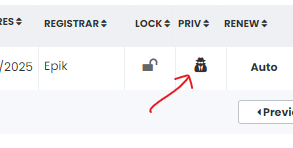
Click on 'Set Domain Privacy off'.
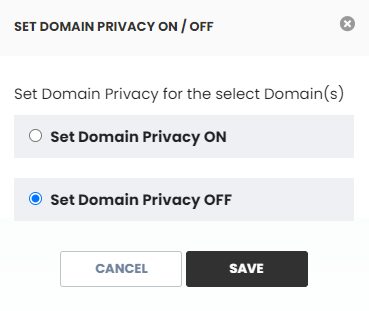
Click the 'SAVE' button.
That’s it!
Confirm your domain contact details
Before initiating your domain transfer, confirm that the contact details linked to your domain are current and keep an eye on your domain's email address.
When transferring your domain to Trustname, if you choose to use your own contact details, Trustname will send you an email to confirm the transfer request, and this message will be sent to the associated domain email address.
However, if you used Trustname's pre-defined contact, we won't need to verify this information as it's already verified.
To confirm your domain contact details on Epik, click on 'My Domains' under the 'My Account' dropdown in the header and click on the three bar menu beside your domain name in the list.
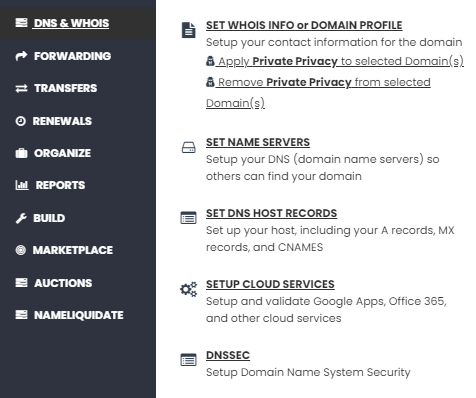
Under 'DNS & WHOIS' click on 'SET WHOIS INFO or DOMAIN PROFILE' to review the contact details linked to your domain:
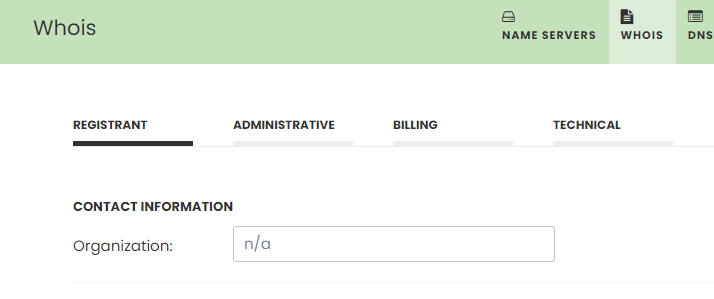
Here, you will be able to review your registrant, administrative, billing, and technical contacts. Your focus should be on the 'REGISTRANT' tab. Review your email address and your contact details to make sure they're up to date.
Your domain is ready for the move!
Transferring Your Domain From Epik To Trustname
We are so excited to have you, we can't wait.
To send your Epik domain on its way to Trustname, follow these steps:
Head to our Domain Transfer page
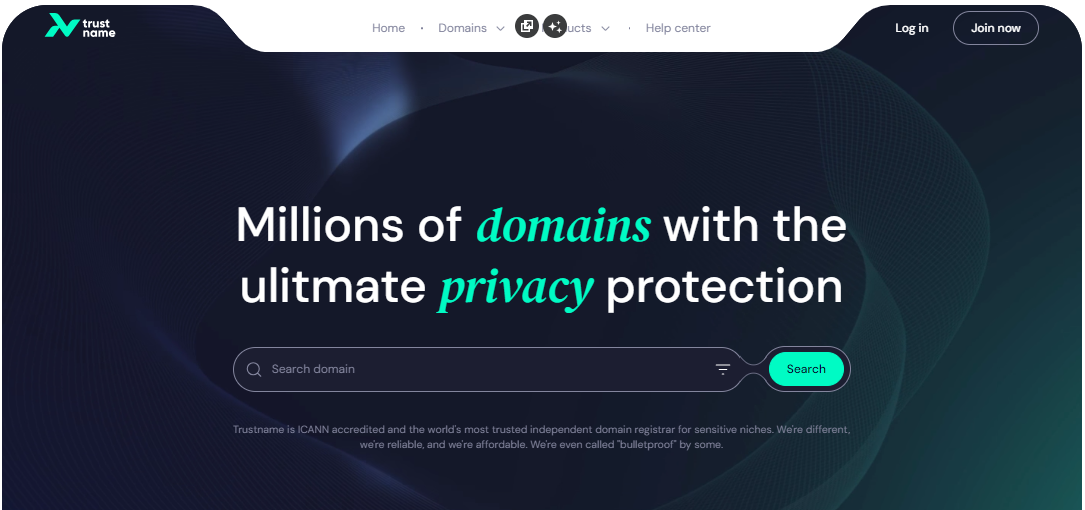
- Head to the Trustname.com website and click 'Log In' at the top right corner to access your Trustname account.
- Fill in your account username and password to gain access to your customer portal.
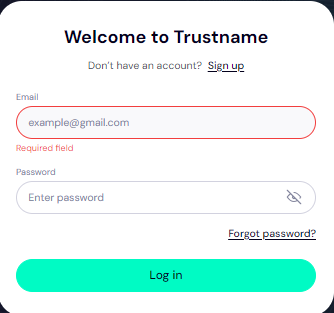
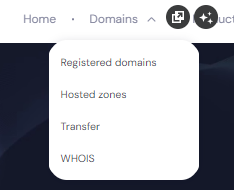
Click 'Log in'. - To access your domain transfer settings, under the 'Domains' dropdown in the header, click on 'Transfer'.
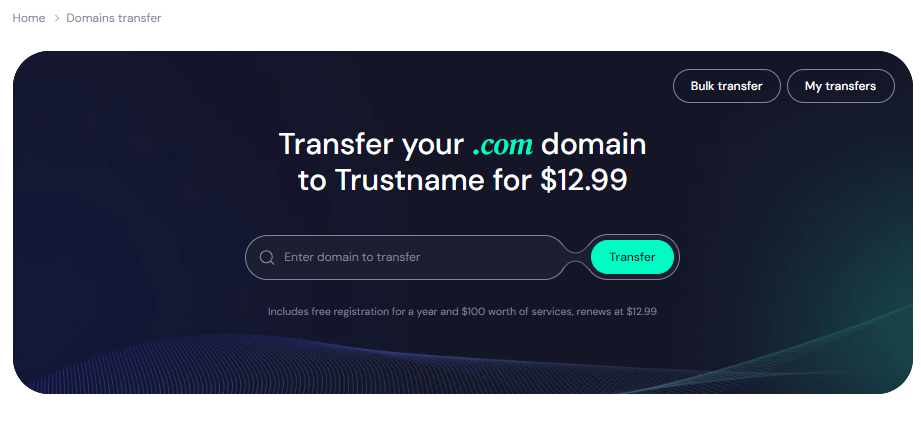
- In the Trustname domain transfer portal, type in your domain on Epik including the top-level domain (domain extension) and click on the 'Transfer' button.
Give us the Auth Code (EPP)
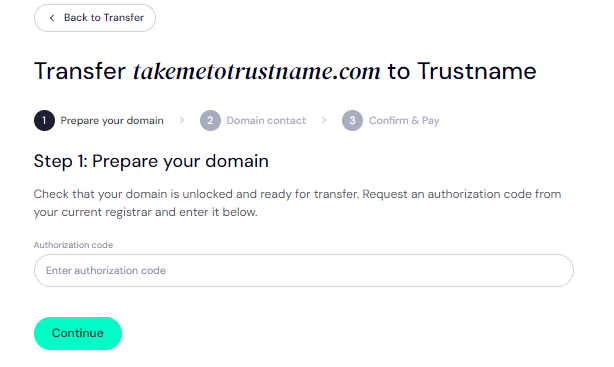
Next, copy and paste in the Auth Code (EPP code) you copied from the Epik portal earlier or from your email and click on 'Continue'.
Enter Domain Contact
On the next page, specify your domain contact details. You can choose to use your own details by clicking on the 'Choose contact' dropdown and selecting 'Add new contact'.
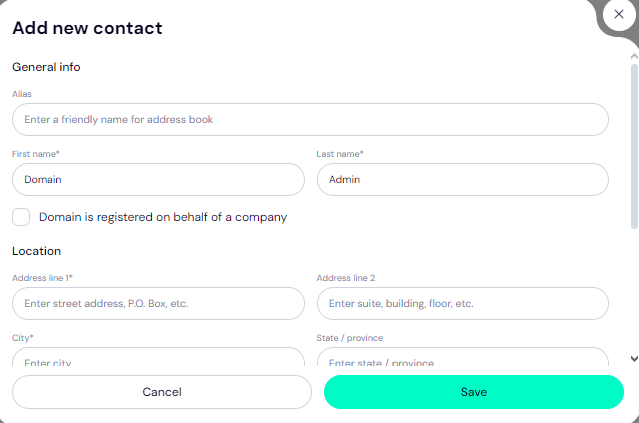
Or you can enjoy the highest possible privacy by choosing 'Use a pre-defined contact' to enable Trustname's Two-Tier Privacy Protection. With the second option, your domain contact info will be.
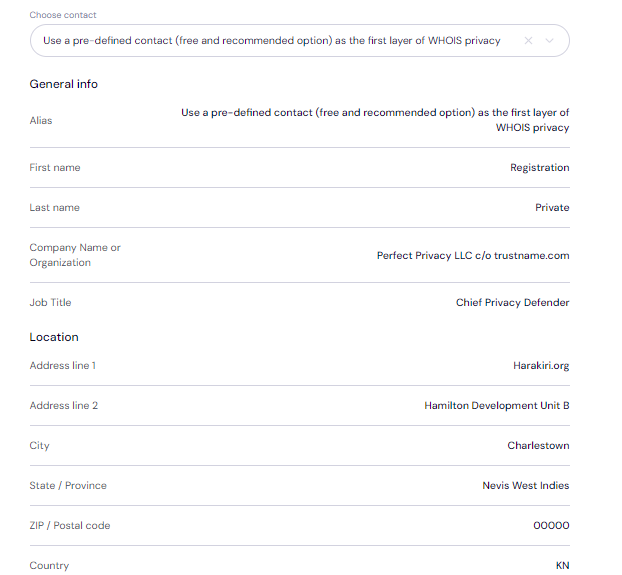
Remember, if you choose our pre-defined contact, you won’t need to verify any details since this information is verified and your domain can move more quickly.
You retain full control of your domain with our Two-Tier Privacy enabled we only offer this service to give you the most privacy and minimise your digital footprint.
After filling in your domain contact details, click on 'Continue'.
Pay for an extended registration
On the next page, pay for your domain transfer and get 1 extra year added to your domain’s current expiry date.
- Enter your billing address. You can also select 'Same as my contact address' so you don't need to fill it in manually again.
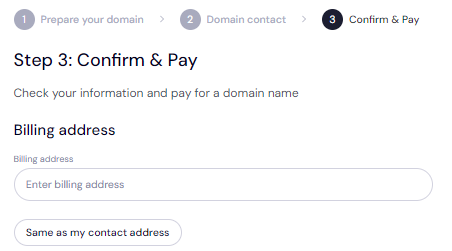
- Choose your payment method. You can use a bank card or existing funds in your Trustname wallet to make a payment.
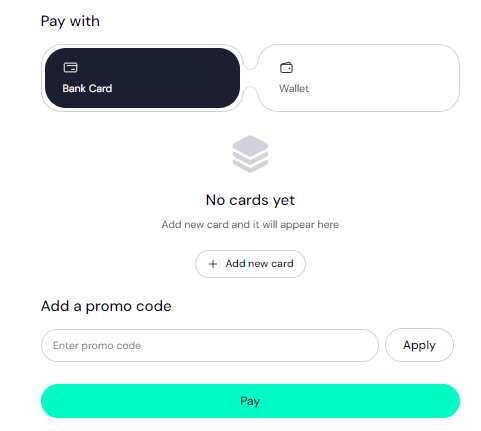
If you don't have a bank card set up yet, click on 'Add new card' and fill in your card details to have it set up.
Trustname also accepts cryptocurrencies for payment!
Trustname's domain transfer promo code - WELCOME777
- Trustname's standard domain transfer fees are fixed at $14.99 per year with $0 added for taxes and ICANN fees included.
- By using the promo code WELCOME777, you will receive a 50% discount and will be charged only $7.77 for your domain transfer from Epik.
- This transfer includes a free 1 year domain registration, which will be added to your domain’s current expiry date.
- After the first year, your domain will renew at the standard price of $14.99 per year for .com, .net, and .org TLDs.
- This pricing is among the most affordable options over a 5-year term when compared to Epik and other competitors.
To enjoy our promo, type in WELCOME777 in the 'Add a promo code' section.
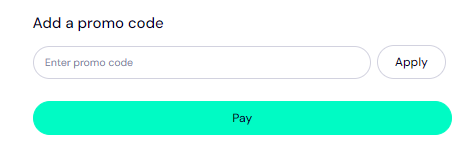
Specify the registration duration
Select the number of years you want your domain registration to last. You can choose a subscription period between 1 to 10 years at a time.
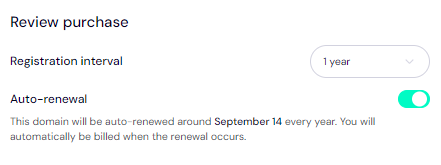
We also recommend leaving the auto-renewal option enabled so that your domain name can be renewed well before it expires.
Make your payment
- Clickon the 'Pay' button.
- You can follow the on screen prompts to complete your payment.
That's it! Your domain name should be on its way from Epik to Trustname.
Safeguarding Your Domain at Trustname
Once your domain is with us at Trustname, you can take these extra steps to secure your account and domain(s):
- Review Our Two-Tier Privacy
When transferring your domain name, if you choose 'Use a pre-defined contact' for the domain contact details, you will now be enjoying our Two-Tier Domain Privacy.
You can head to Domains >>> Registered Domains >>> Domain Contacts to change your domain contact details at any time to your own details and enable/disable our Two-Tier Privacy at any time.
Read Why Trustname registers domains in the name of Perfect Privacy LLC. to learn more about our Two-Tier Whois Privacy.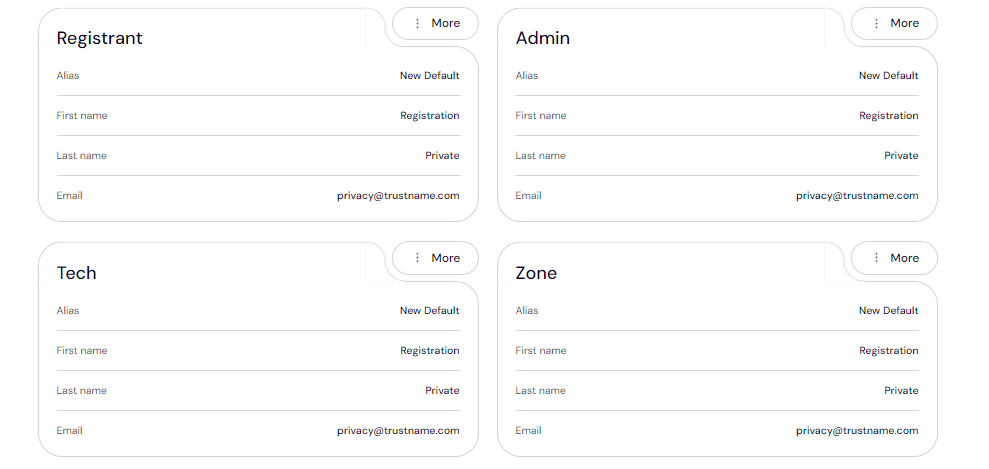
- Review the domain lock
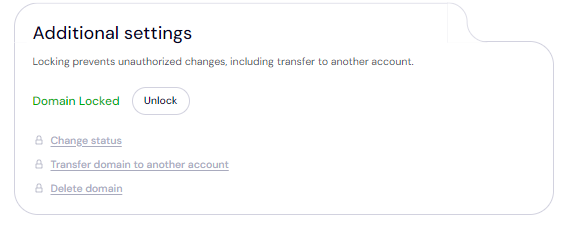
Your domain transfer lock is automatically enabled once you transfer it to us. To view your Domain Lock settings, click on Domains >>> Registered domains >>> Select domain and then scroll down to the Additional settings field.
- Verify the DNS settings
You can also review your domain nameservers and DNS records.
To review your domain nameservers, head to the Domain Nameservers section.

And to check your DNS records, under General info, look for Hosted zone and click 'View'.
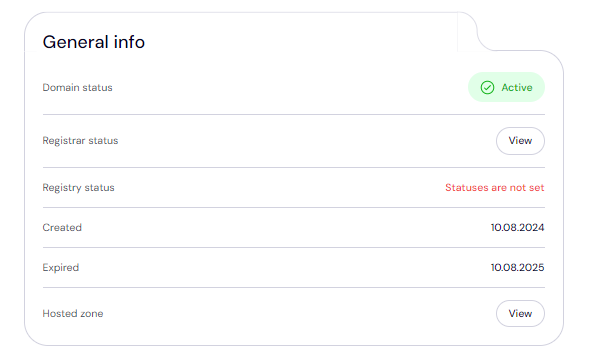
From here, you can add and edit your existing DNS records, tweak your nameservers, and enable DNSSEC.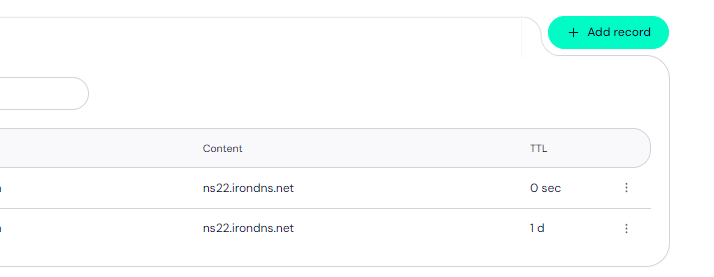
- Set up 2FA
With two-factor authentication (2FA) enabled, whenever anyone tries to access your account, they'd need your login credentials as well as a code generated by an authenticator app on your mobile device.
To set up 2FA on your Trustname account:
[+] [List] Green Ordered - Log in to your Trustname account and go to My Profile.
- Click on 'Account Settings'.
- Scroll down to Two-Factor Authentication (2FA) and toggle the button ON.
- Download the Google Authenticator app from your device's app store (if not already installed).
- In the authenticator app, scan the QR code displayed on the Trustname portal or manually enter the secret key provided.
- The authenticator app will generate a six-digit verification code.
- Enter this verification code into the Trustname portal.
- Click 'Enable' to complete the 2FA setup process.
Save the backup codes provided by Google Authenticator during setup. These will help you regain access if you lose your device.
Read how to set up two-factor authentication (2FA) on Trustname for more details.
Troubleshooting Failed Domain Transfers
If you run into any issues while transferring your domain from Epik to Trustname.
These are the common reasons why domain transfers fail and how to troubleshoot them:
- Wrong EPP Code
We recommend copying your Auth Code directly from the Epik portal or from the email they send to you and pasting it into our required field instead of manually typing it out.
- Not Confirming Domain Eligibility
Confirm that your domain is eligible and out of the 60 days lock in your Epik account before proceeding with the transfer.
- Transfer Lock
If the Domain Lock is still turned on, Epik won't release the domain name. Check your domain settings to ensure the Domain Lock is disabled as shown earlier.
- Check Your Emails For Approval Requests
If you used your own details on the Trustname side while transferring it, you would need to verify them as your domain is transferred. Look out for emails from us!
Rounding Up
Many customers recognise that Epik is a sinking ship, and there's absolutely no reason why you should hold onto your domains there and put your online presence at risk.
From delayed registrations to shady refunds and customers losing their domains without warning, we're sure you don't need further convincing on why you should move your domains to Trustname.
We provide far superior support, instant registrations, support multiple payment methods, and give you the very best domain privacy on the market, which also makes verifying your domain contact easy.
The domain, copy the Auth Code, disable domain privacy, and confirm that your contact details are up to date.
We're waiting for you!